
You’re nearly there. The final step is to sign the Participation Agreement, the legal contract between the company and Smart Pension, the pension provider.
Here’s how to get it done:
1. Smart Pension will email the company directly - so no action needed from you here.
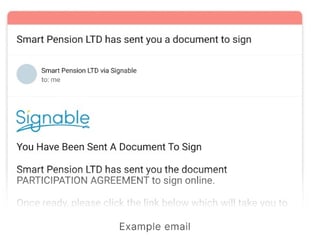
Once the pension is live in the Thrive Employer Portal, the employers signatory will get an email directly from Smart Pension. That email will include a link to the Participation Agreement.
If the employer hasn’t received it, contact Thrive Support and we’ll get it resent.
2. Read the Master Trust document
In the same email, they’ll find a link to the Smart Pension Master Trust document. It covers how the scheme works and the key responsibilities. Encourage your clients to read it.
3. The company will need to sign the agreement online
To do this, they simply click the ‘Sign on Signable’ button in the email and follow the secure link to complete the digital signature. It’s quick and easy.
4. Do it before your staging date
Make sure the company signs the Participation Agreement before their staging date. This ensures everything’s in place for their Declaration of Compliance.
Need a hand?
We’re here to help. Get in touch with Thrive Support and we’ll walk you through it.