
Thinking about adjusting your pension contributions? Here’s what to expect.
Once we’ve received your first contribution, you can change your pension contributions whenever you like. Just head to Contribution Settings within the pension section of your Thrive app.
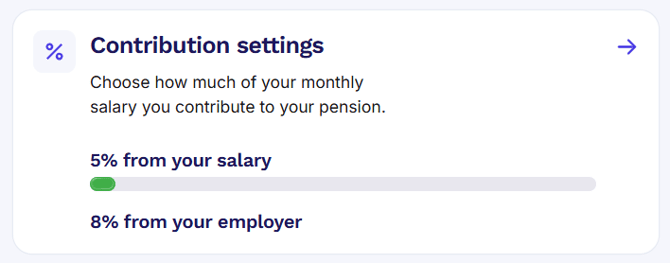
Head to Settings and choose the percentage you’d like to pay going forward. We’ll let your employer know about the change. They’ll update it in the next pay run.
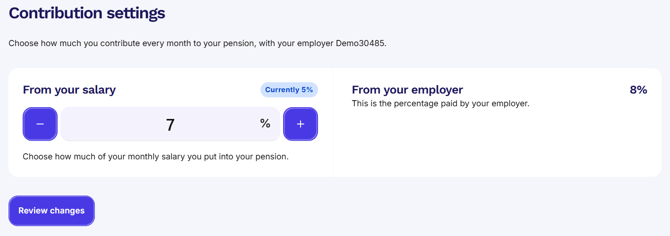
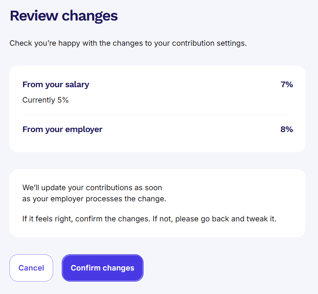
Whether you're upping your contributions or trimming them back, it’s good to know how those changes affect your overall pension pot, especially if your employer offers matching contributions.
Employer contributions may change too
If your workplace pension includes contribution matching, bumping up your contributions could mean your employer adds more too! But if you reduce what you pay in, their share might drop as well.
To get a clear picture, it’s worth checking with HR or Payroll. They’ll confirm what’s matched and what your total savings look like once the changes kick in.
When will the changes take effect?
Any updates you make are usually applied from your next payday, as long as you’ve made the change before payroll is processed.
Good to know
- You can change how much you pay into your pension anytime, once your first contribution has gone through. Need to make a change before then? Speak to your HR or payroll team. They’ll be able to help
- Your employer’s contribution might change based on what you pay
- Changes take effect from your next payroll (if submitted in time)
Your pension, your pace. Make changes when it suits you, and we’ll take care of the rest.